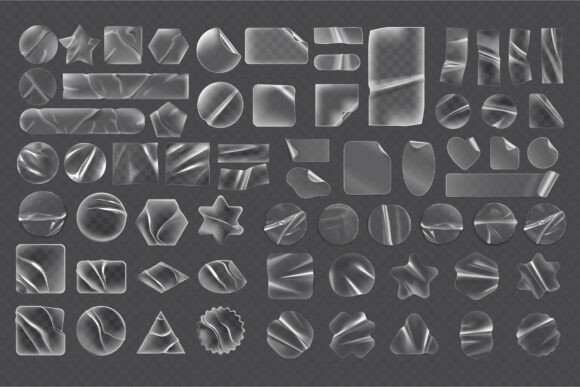
Transparent Wrinkled Stickers SVG Set
In the world of digital design, perfection is often overrated. While clean lines and smooth gradients have their place, there is a distinct charm in imperfection that speaks to authenticity. This is where the Transparent Wrinkled Stickers SVG Set becomes an essential asset for any creative professional. Unlike standard vector shapes that can feel sterile or overly polished, this collection captures the organic texture of real-world materials. It mimics the subtle crumples, glued edges, and light refractions found on actual adhesive labels, bringing a tactile quality to flat digital screens.
Whether you are crafting a brand identity that needs to feel approachable or designing social media graphics that demand attention, these assets bridge the gap between digital precision and physical reality. The set includes 65 unique SVG files, each rendered with a realistic cellophane effect that suggests depth and dimension without cluttering your composition.
Bringing Texture and Depth to Flat Designs
The visual personality of the Transparent Wrinkled Stickers SVG Set is defined by its ability to simulate physical interaction. When you apply these overlays to your work, they introduce a layer of complexity that simple solid colors cannot achieve. The "wrinkled" aesthetic isn't just about distortion; it is about how light interacts with a surface that has been handled, peeled, and applied.
This style works exceptionally well when you want to soften the rigid geometry of modern typography or graphic elements. Imagine placing a bold, sans-serif font inside one of these transparent shapes. The slight warping and creasing of the sticker overlay create a dynamic tension, making the text feel less like a static element and more like a physical object placed on top of the background. This technique is particularly effective in packaging design mockups, where clients need to visualize how a label will look on a bottle or jar before production begins.
For editorial design, these stickers offer a way to highlight key quotes, pull-outs, or captions without resorting to heavy borders or drop shadows. They act as visual anchors, drawing the eye naturally while maintaining a cohesive, hand-crafted vibe. The variety of shapes included—circles, ovals, rectangles, stars, and rhombuses—ensures that you can match the sticker's geometry to the mood of your project, whether it requires the softness of a circle or the structure of a square.
Strategic Applications Across Industries
The versatility of this vector pack extends far beyond personal scrapbooking. In the realm of brand identity, using textured assets can differentiate a business from competitors who rely solely on sleek, minimalist aesthetics. A startup aiming for a "maker" or "artisanal" image can leverage these wrinkled effects to communicate craftsmanship and human touch.
- Social Media Graphics: In feeds dominated by high-gloss photography, a post featuring a transparent, crumpled sticker overlay stands out. It feels curated and authentic, encouraging higher engagement rates.
- Web Design: Use these PNGs as call-to-action buttons or badge icons. The realistic texture adds a layer of interactivity, suggesting that the element is clickable and tangible.
- Merchandise and Apparel: For designers using Cricut or Silhouette machines, the SVG format allows for precise cutting. You can print these designs on vinyl and apply them to tote bags, t-shirts, or water bottles, achieving a distressed, vintage look that is highly popular in streetwear fashion.
- Digital Scrapbooking: Hobbyists can use the high-resolution PNGs to create memory books that look like they were assembled with real paper and tape, preserving the nostalgia of analog projects in a digital format.
When integrating these assets into a logo design, caution is advised. While the texture is striking, logos require scalability and clarity at small sizes. However, for secondary branding elements, such as website favicons, email signatures, or packaging seals, the detailed texture adds significant value and recognition.
Technical Flexibility and Workflow Integration
One of the strongest selling points of the Transparent Wrinkled Stickers SVG Set is its comprehensive file format support. As a designer, workflow efficiency is paramount, and this set accommodates almost every tool in the industry. The inclusion of editable AI and EPS files means you are not stuck with static images. You can open the vectors in Adobe Illustrator or CorelDRAW to adjust the color fill, modify the opacity of the wrinkles, or even redraw specific paths to fit a custom shape.
For those working with cutting machines, the provided DXF and SVG files ensure compatibility with both Silhouette Basic Edition and advanced Cricut software. This eliminates the frustration of converting formats or losing detail during the import process. The 65 high-resolution PNG files with transparent backgrounds are ready for immediate drag-and-drop use in Photoshop, Canva, or PowerPoint, saving hours of rendering time.
Scalability is another critical factor. Because the core assets are vector-based, you can scale a small circular sticker up to the size of a billboard poster without any loss of quality. The intricate details of the glue lines and creases remain crisp, ensuring your final output looks professional regardless of the medium. This makes the set a true commercial font equivalent in the world of graphic assets—a reliable tool that grows with your project needs.
Evaluating Fit and Enhancing Readability
While the aesthetic appeal is clear, successful implementation requires a strategic approach to readability and hierarchy. The wrinkled texture introduces visual noise, which can sometimes compete with text if not managed correctly. To maintain legibility, pair these stickers with strong, high-contrast typefaces. A thick, geometric sans serif font often works best against the chaotic texture of a crumpled sticker, creating a balance between order and disorder.
When choosing the right asset from the set, consider the emotional tone you wish to convey. A heavily creased, opaque-looking sticker might suggest durability and ruggedness, suitable for outdoor gear brands or adventure blogs. Conversely, a lighter, more translucent overlay with subtle folds feels delicate and elegant, fitting for wedding invitations or beauty product marketing. Always test your design in grayscale first to ensure the contrast holds up before adding color.
Font pairing is also crucial. If you are using a script font or handwritten font within the sticker, ensure the letterforms are bold enough to cut through the texture. Avoid thin, hairline scripts that might get lost in the visual complexity of the wrinkles. Instead, opt for a display font with character, or stick to a clean modern typography style that lets the texture do the talking.
Finally, remember that this is a digital download intended for immediate use. Once you have the files, take the time to experiment with blending modes in your design software. Setting the sticker layer to "Multiply" or "Overlay" can drastically change how it interacts with the background, offering endless possibilities for creating unique, layered compositions. By treating these assets as flexible tools rather than fixed decorations, you unlock their full potential to elevate your creative projects.